Created a VS workflow that starts when an item is changed.
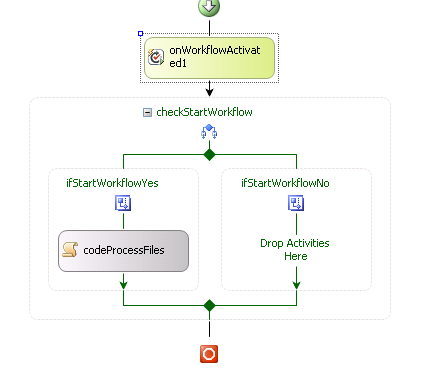
Within the codeProcessFiles activity, I've added basic error handling using a Try Catch statement. When an exception is caught, the code updates the item associated with the workflow, sends out an email, then attempts to stop the workflow. For some reason, the workflow will continue to the next step in the code.
Should I have designed the workflow using a While activity? Then setup the While activity to keep running if a status field equalsprocessing or something to that extent?
Code examples:
try
            {
                bool bValidate = Validate.ConfigAndHistory(sWorkflowURL);

                if (bValidate == false)
                {
                    throw new Exception();
                }
            }
            catch (Exception)
            {
                //send email to user
                Global.sEmailSubject = "SharePoint Test Job " + sItemID + " Failed";
                Global.sEmailBody = "<html><body>Config and History lists are not valid. </body></html>";

                Boolean bSendEmail = SendMail(Global.sEmailSubject, Global.sEmailBody, true, "zzzzz@abvdddd.com", Global.sUserEmail, null, null, sSMTPAddress);

                workflowProperties.Item["Copy Status"] = "Error";
                workflowProperties.Item["Start Workflow"] = "No";
                workflowProperties.Item.SystemUpdate();

                //log to history
                Common.WriteFailToHistoryLog(workflowProperties.Web, workflowProperties.WorkflowId, "Config and History lists are not valid.");
                //stop worklfow
                Common.StopWorkflow(sWFListURL, sItemID);
            }
public static void StopWorkflow(string sListURL, int sItemID)
{
SPSecurity.RunWithElevatedPrivileges(delegate()
{
using (SPSite site = new SPSite(sListURL))
{
using (SPWeb web = site.OpenWeb())
{
SPWorkflowManager manager = site.WorkflowManager;
SPList sList = web.GetList(sListURL);
SPListItem item = sList.GetItemById(sItemID);
foreach (SPWorkflow workflow in manager.GetItemActiveWorkflows(item))
{
foreach (SPWorkflowTask t in workflow.Tasks)
{
t["Status"] = "Canceled";
t.Update();
}
SPWorkflowManager.CancelWorkflow(workflow);
}
}
}
});